
Hardware, software and expert advice for digital signage and kiosks |
|
WireSpring BlogMaking great digital signage content: Use contrast to your advantageAuthor: Bill Gerba on 2008-04-30 18:11:09 When we make a substantial change to a piece of content, we expect it to have an equally substantial effect on how the content is perceived by viewers. But if this relationship fails to hold, as we saw in last week's article about color, it can be rather confusing to decide what comes next. After all, agencies around the world spend countless hours making sure that their ads conform to brand style guides and best practices, matching fonts, colors and animated effects against a list of approved choices. Surely it's not all in vain, right? To some extent, I'd argue it is. While consistent visual design is important for presenting a unified face to consumers across multiple channels, the recommendations you see in the corporate style guide aren't necessarily the best ones for helping viewers notice and remember your message -- especially if your message is coming across on a medium or in a venue that wasn't considered when those best practices were first established.Concept, style, and the path to "good enough" Unfortunately, figuring out the combination of visual elements, styles, and colors that will elicit the best possible response is next to impossible. For starters, you would have to test a huge number of variations. Next, as long as different people continue to think and act differently, you (the designer) will come up against the law of diminishing returns once your content is "good enough" for most people. But what's the quickest path to "good enough," since even getting that far might take more time than you care to invest? After a lot of research, we've concluded that there are basically two kinds of changes you can make: concept changes and style changes. Here's an example: A concept change would be deciding whether or not to use the pink bunny in your Energizer spot. However, a style change would be deciding whether to have it on a black background or a white one (gross simplifications here, but hey, these posts tend to run on too long as it is). Aside from a few high-level generalizations, there's no way I could possibly tell you what the right concept for your brand/product/category is. That decision usually gets made by people high up the corporate ladder as part of an overall strategy or campaign. But what I can talk about, after lots of trial-and-error testing, are some important style changes to try out -- particularly style changes that affect the contrast of your images. Adding contrast to the mix As we alluded to last week, one of the first things that designers try to tweak (whenever possible) is the color scheme of the content. Admittedly, there are cases where tiny changes in a color or gradient can really improve the aesthetics of a piece, whether it's on TV, in print or on a digital sign. But as it turns out, contrast, not color, is far more important when it comes to getting your content noticed, watched, and remembered. Because digital signs -- whether LCDs, LEDs or plasma displays -- all emit light (as opposed to regular posters which reflect ambient light), their ability to show contrasting colors actually changes with a person's viewing angle. Thus, if somebody glances at your screen but doesn't see it head-on, they might miss the bright colors and clever imagery that you're using. In the worst case, all they'll be able to see are the outlines between light and dark areas. I think that's why changing the contrast of different visual elements can have such a significant impact on the overall readability and recall of digital signage content. Not surprisingly, Clear Channel and other billboard companies have done a significant amount of research on which color combinations are easiest to see and read, and we've found that their conclusions hold up extremely well for indoor digital signs too. For example, consider these four color combinations:
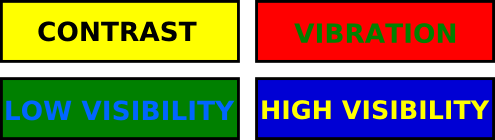
Overlapping areas of complementary colors (for example, red and green) are difficult to focus on because our brains tend to interpret the different wavelengths of light that they use as slight vibrations. This makes the text harder to read and other visual elements harder to distinguish. Likewise, overlapping colors with a similar color value (brightness) will be difficult to distinguish for most people (and virtually impossible for the color blind). This problem is worse on LCD screens, which have the most trouble maintaining high-contrast imagery when the viewer isn't standing more or less directly in front of the screen. To maximize exposure and guarantee that signs are noticed and read, Clear Channel also makes a few recommendations, including this palette of 14 high-contrast color schemes for use in outdoor billboards:
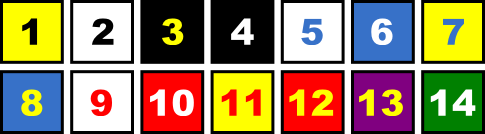
Black and yellow provide the most bang-for-your-buck when you're designing out-of-home ads, even though black-and-white would be a higher contrast choice. The reason has to do with the physiology of the eye as well as the context where the ads are seen: Since black and yellow have both different hues (colors) and values (brightnesses), the eye readily distinguishes between them using both its rods (brightness detectors) and cones (color detectors). From a context perspective, yellow is less prevalent than white in the typical outdoor environment, so yellow content tends to be more eye catching. Content creation for digital signage is essentially a constant struggle between getting noticed and getting remembered. Thus, the small tradeoff in readability by using less-contrasting yellow instead of white can be justified by the greater chance of grabbing a viewer's attention in the first place. How better contrast buys you more impressions The contrast between foreground and background can have a big impact on how easy it is to decipher content on the screen. In some cases, even a minor tweak (like increasing the contrast between foreground and background by 10%) can make the content recognizable to a much larger potential audience, since people can see it from a wider angle. Contrast also has a direct impact on readability, which in turn influences how well viewers will recall your content. So, make sure to consider what your spots look like to people across the aisle, down the hall, or on the other side of your lobby. What looks spectacular on your monitor 18" away may be indecipherable if you move back a few feet or turn your head by just a few degrees. Next week, we'll delve into another area where contrast is critical: separating out moving elements so your viewers can focus on the important part of your message. One of the big advantages of digital displays is their ability to show moving images. But believe it or not, using motion doesn't always make content more eye catching. We'll investigate how to include the right amount of movement when we talk about silhouettes, our term for contrast-in-motion. Meanwhile, if you have any tips on how to create high-contrast content while keeping the style guide police at bay, leave a comment and let me know! Comments (10)
Subscribe to comments for this article
| Trackback
2008-04-30dkr writes: I wish Bank of America had learned this lesson. Their blue on red signs give me a "vibrating" headache. 2008-05-01Craig Burnard writes: Bill I have been in the advertsing business for more than 15 years, and there is still a great deal I dont know. My business was established to specifically assist business in their digital signage creative. My designers have spent 3 to 4 years at film school to learn what they know. I therefore have great difficulty in grasping why when it comes to instore digital POS, businesses are encouraged down a DIY route to content creation? Why not leave this to the professionals, no different to press, tv, internet and radio? Surely, having spent significant $ getting a prospect across the threshold, the last thing to do is confront them with badly made and ill conceived screen content! What a wasted opportunity! Advertsising is more art than science. How will digital signage be treated seriously as a medium when the bulk of content is home spun? Sorry Bill, but as a leading educator in the industry let's start to raise the standard and leave business owners to what they know best i.e. running their business! Regards Craig Burnard 2008-05-01Francois Reeves writes: Well @Craig, Bill is making very good points about an unspoken truth. The traditional advertising agencies and talents were brought up and educated on "print". Most corporate artwork guidelines are still for stationary and logo placement. Reflected light on a surface and emitted light behave almost oppositely when it comes to eye colour appreciation. While I agree with you that some "home made" generated ads can be damaging to a brand, I also think that a lot of creatives haven't grasped digital media potential just yet. Animation, surface, video effects all affect colour perception and we have just skimmed the surface of possibilities. Add 3-d rendering to the mix and the learning curve shatters 2 dimensional print designing... 2008-05-01Kevin writes: While I agree with the above 2 comments, small business advertisers don't always want to pay or can't afford expensive creative when they aren't sure the medium will work. There are still going to be the home office people that do the work. By educating our smaller networks in proper design and layout Bill is helping the whole industry by ensuring that the product is at least somewhat presentable and doesn't get a bad name. 2008-05-01Bill Gerba writes: Hi Craig: I certainly don't mean to suggest that there's no place for professional content development in our industry. In fact, I feel it's quite the opposite. The problems we have right now are along the lines of what Francois and Kevin have noted. There are very few agencies and creative shops out there with actual digital signage experience, and as my content articles have pointed out, it's a very different medium than TV, print, or even posters. Thus, the exceptionally well-produced, aesthetically pleasing, high production value stuff that comes out of shops today often doesn't work on screen -- or at the very least doesn't work well enough to justify its high costs. Consequently, we see a lot of the small guys hiring one or two designers in-house, and spending the time and their own internal resources to figure out what does actually "work." Once they've developed their own secret formula, they're very hesitant to share with the world, which is why it has taken me so long to get this series of articles out :) I certainly agree, to your point, that crappy spots can be damaging to a brand. However, even the little guys typically need to get their spots approved by the brands they're serving, so there's a built-in feedback loop that prevents the real dregs from seeping out. It's not perfect of course (there's plenty of crappy content out there to prove *that* point), but my feeling is that it prevents enough potential brand damage for that to have become a significant problem at this point. I think we'll see more agencies and bona fide content creation houses get involved in the space as more of them wander in, get experienced, and start making a name for themselves in digital out-of-home. Likewise, as smaller networks band together to form larger ones, and as brands try to participate on these larger ones, there will be the opportunity for the bigger spends that are often required to go with professionally produced, high-end content. 2008-05-01David writes: Thanks Bill for compiling this information. As digital signage evolves we will clearly learn more about viewer perception and best practices and you've given us a great start. I find that in designing content for our signage networks the biggest hurdle is often getting corporations to acknowledge that our industry is indeed different. After all it's just a LCD screen it should be just like TV... right? The moment you can set a new design in front of them and show clearly the impact of high contrast, organic motion and simple low clutter design the light bulb goes on and the conversation becomes about how to adapt their messages to digital signage as opposed to how we can shoehorn their current assets into the new medium. In creating content I try to remember what I learned in my first year color theory class; cool, low saturation and low value colors work best for backgrounds. While warm, high saturation, high value color really draws the design element forward into space. Combining this idea with the combinations you've listed in this article has been very successful for me in the past. 2008-05-01Don writes: For the print designer trying their hand at signage, there are good tips here. Designing for remote screens is challenging, many of the same reasons as it is for the web, kiosk and ATMs. In many cases, you don't know what the monitor looks like and the environment it's in. At driveups, there can be strong glare certain times of the day, etc. Increasing contrast and keeping font sizes up for legibility is crucial. Careful with red or white backgrounds, etc. I think Craig is alarmed by the idea this might be more of a tutorial for non-designers, which of course wouldn't be advisable. That's understandable since some of the design principals mentioned here are basic graphic design and not specific to digital signage. 2008-05-02Jeff Dickey writes: Bill, When we started Doubleclick we did significant testing of creative to determine which combinations of color and graphics elicited the highest levels of response. We learned that the following elements will drive 300 -400% variations in response rates to a given advertisement:color;animation; and message. Message was, in fact, the least important factor. Color was first and the level and types of animation were second. As an example, an advertisement with exactly the same message and creative would generate up to 400% more clicks when a lime green background was placed on it instead of a red background, etc. SeeSaw is exploring how Internet learning will also apply to digital signage, as we feel that it possesses many of the same characteristics of the net. DS operates in active, cluttered environments (cluttered with people) and is a screen in search of an audience. The Internet is active and cluttered with motion and content, driving advertisers to continue to develop new ways to message that break through and produce an action from the viewer. I look forward to more of your commentaries and input from your readers as more information becomes available. 2008-05-02Bill Gerba writes: David: You're definitely not alone - content creation for this medium seems to be a challenge for lots of folks right now. Fortunately, enough time has passed to where the really obvious mistakes (e.g. simply re-playing TV commercials) are usually avoided. Lots more work to go still, of course! Don: Of course there's no substitute for solid graphic design experience, so I think you're right -- somebody would have to already know about the basics of designing for another medium -- whether it be print, tv, the web, whatever -- to get the most out of it. That having been said, though, I'm hoping that even novices and non-designers will find these articles helpful at least for avoiding the most common mistakes. Jeff: I was also surprised to find that more best practices from the web didn't work in the real world, and I suspect that it comes down to viewer attention. Banner ads on websites work because your viewer is already looking at the screen -- they wouldn't be on your website otherwise. Thus, even ads on a very cluttered screen have relatively unfettered access to the viewer. Contrast that with a retail store, on the other hand, where there is a large volume of space to navigate, multiple formats of promotional materials and mixed media (audio, video, and event scent and taste in supermarkets, etc.), additional noise and traffic from other patrons, and so on. There's simply too much for the viewer to devote any large amount of attention to. Thus, the "look at me!" approach that gets by on the web is filtered out by the viewer in-store (to some extent, at least). Thus, I think, whether or not a piece of content has impact has more to do with whether it's memorable than whether it can attract your eye from 200 feet away. 2008-05-02Jeff Dickey writes:
Bill, No disagreement but when I look at the Apple Ipod ads, either with of without motion, their color combinations tend to mirror exactly what we found to be effective on the net - hot yellows, lime green, hot pink, etc. And, I believe that they are some of, if not the most noticed and memorable in the OOH environment. This probably goes to to point that "one thing ain't enough". Possibly the overarching theme here is, in general, why should I pay attention to DOOH at all. I believe that, as the "formula" for DOOH starts to get a lot more cohesive, we'll all be discovering just how complex all of this really is but a roadmap just may appear to our combined benefit. Leave a CommentPrevious Article: Making great digital signage content: Does color matter? Next Article: Is the digital profiling of in-store shoppers a recipe for privacy disaster? Front page of dynamic digital signage and interactive kiosks journal LEGAL STUFF: The WireSpring Blog is written by Bill Gerba but may periodically include articles by guest authors. The author of each article is clearly identified at the start of the article. The opinions expressed in each article are solely those of the author, and do not reflect the official opinions of WireSpring Technologies, Inc. All blog articles are copyright © 2004-2008 William F. Gerba or the guest author, as appropriate. All content besides the actual article text, e.g. surrounding branding and informational content, is copyright © 2000-2008 WireSpring Technologies, Inc. All rights reserved. Except as provided in WireSpring's Republishing and Syndication Policy, no blog content may be reproduced, in whole or in part, without WireSpring's express written consent.
|
Subscribe by email or RSS
To receive an email whenever we publish a new article, enter your name and email address:
If you use one of these services, click the button to subscribe to automatic updates:
For advanced users or those with other services, here is the XML link:
Learn how to...
What's this page about?
We created this journal to help share useful info on the digital signage and kiosk markets. Our articles typically focus on project planning, industry research, ROI analysis, and high-profile deployments. We post new, original articles about once a week.
Who's the author?
Bill Gerba is CEO of WireSpring and maintains an active role in the digital signage and self-service kiosk industries. An industry advocate since 2000, Bill is the chairman of POPAI's Digital Signage Awards and a member of the group's Education and Advocacy Committees. He is a frequent speaker at industry conferences (including the Digital Signage Expo) and has been featured in numerous publications. If you would like Bill to provide feedback for a story you're working on, or you want him to speak at your event, please contact us.
|
| Questions? Start a live chat • Call us at (800) 989-9269 or +1 (954) 548-3300 • Get an instant price quote |