
Digital Signage Content Creation: Grabbing the Low-Hanging Fruit
Author: Bill Gerba on 2010-04-08 12:53:17
Today's post is light on words but heavy on visuals. Well, one visual anyway. You see, I've been working on updating our series about
how to make great content for digital signage. In the process, I decided to whip up a little graph for those folks who are new to digital signage content production, with the goal of making it easier for them to decide where to invest their time and effort. I blame the current lack of great content on a few potential culprits. First, there are still lots of designers who simply don't consider digital signage to be its own medium, and thus don't bother adopting any practices to take advantage of its best properties. Next, there's a lot of conflicting (and often flat-out wrong) information on the Internet about what does and doesn't make digital signage content useful and effective. Plus, even the good resources tend to make presumptions about the content creator's overall skill level and familiarity with more advanced digital signage concepts like dwell time, trip duration and loop length. And finally, most resources on the web are quite long and somewhat hard to get through. Our guide is one of the shorter ones out there, but at 10,000 words and counting, it's still pretty daunting for the newcomer.
What are the easiest ways to make your content more effective?
To answer this question and provide some perspective for those who are new to the business, I put together the following illustration:
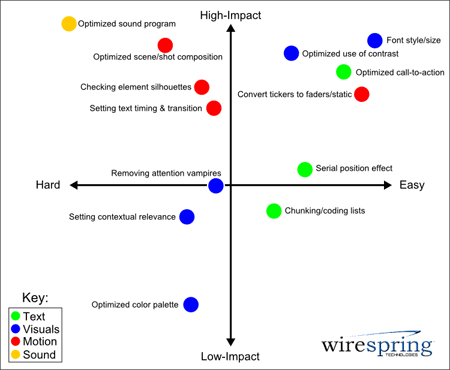
While this isn't a scientific measurement of "difficulty" or "effectiveness" (how could it be?), I think it highlights a couple of important things. For example, an effective sound program can dramatically improve the effectiveness of your content. It's also just about the hardest thing you could choose to tackle, considering that a bad sound program will not only make your content ineffective, but will also cause you to incur the wrath of your screen's host venue and its employees and clientèle. Text, contrast and font-oriented changes yield the best bang for your buck, and are a great place to start testing out optimization procedures.
The rationale here is quite straightforward: text tends to be easier to modify than complex graphical elements, and in some cases can even be dynamically inserted into otherwise finished clips, making for inexpensive tests and edits. Ditto for font faces and sizes, which can have a significant impact on viewing angle, visibility, comprehension and even recall. From an effectiveness standpoint, text does most of the selling in the vast majority of digital signage clips, whether in a retail store or at the DMV, so it's no wonder that optimizing text can have such a strong impact on overall content effectiveness. Contrast changes can be just as effective, but it can be hard to make all of the necessary adjustments to every element of a clip, translating to more time or more money (or both) spent to make and test the change.
Another broad generalization can be inferred from the chart: motion-oriented changes are harder to make than static ones, with the latter group including things like simple changes to visuals/graphics and text. I think this tends to be true in most cases, though perhaps not as much so for vector animations done in Flash versus full-motion video or 3D that has to be re-rendered each time a change is made. Still, as the chart indicates, there are plenty of high-value motion optimization strategies that can make a big impact on who sees and remembers your content.
How well does our chart match up with your own experiences? Have we left out any other ways to make simple content changes that have a big impact? Leave a comment below and let us know!
Subscribe to comments for this article
|
Trackback
Previous Article: Thinking of Writing Your Own Digital Signage Software? Read ThisNext Article: Asking the Tough Questions About Your Digital Signage Content
Front page of Digital Signage Insider Blog
LEGAL STUFF: The Digital Signage Insider is written by multiple authors. The author of each article is clearly identified at the start of the article. The opinions expressed in each article are solely those of the author, and do not reflect the official opinions of WireSpring Technologies, Inc. All articles are copyright © 2004-2013 by their respective author. All content besides the actual article text, e.g. surrounding branding and informational content, is copyright © 2000-2013 WireSpring Technologies, Inc. All rights reserved. Except as provided in WireSpring's
Republishing and Syndication Policy, no articles may be reproduced, in whole or in part, without WireSpring's express written consent.
A Sound Approach to Digital Signage Audio
http://www.wirespring.com/dynamic_digital_signage_and_interactive_kiosks_journal/articles/A_Sound_Approach_to_Digital_Signage_Audio-719.html
and
Digital Signage Content Creation: Grabbing the Low-Hanging Fruit
http://www.wirespring.com/dynamic_digital_signage_and_interactive_kiosks_journal/articles/Digital_Signage_Content_Creation__Grabbing_the_Low_Hanging_Fruit-766.html...